Start with live barcode scanning and basic QR previews. Plus unlocks MRZ, OCR, test tools and History.
GENERATE → ADJUST → TEST
Create a code. Put it to the test.
01 / CHOOSE A FORMAT
02 / ADJUST THE WHITE BORDER
03 / SET UP YOUR SCREEN
Actual app details, brought together to show the steps.
MRZ / OCRBARCODE TESTINGON-DEVICE
AT HOME. ON THE JOB.
Make your next scan useful.
Choose everyday scanning with Basic, or add Plus when you need to capture text, keep results and prepare codes for testing.
FOR INDIVIDUALS
Less retyping. More at your fingertips.
See where a QR link could take you before you open it, read the value on a label or create an on-screen QR from your own text. Basic keeps those everyday tasks close at hand.
Reuse printed text with Plus. Capture a frame or import a photo, then save and copy recognized text with detected line breaks.
Keep the scans you need. Plus stores selected results and available images in encrypted History for later reference.
Take your text further. Send a saved value to Generate, or save a generated PNG to Photos with Plus.
Give staff a way to inspect raw label values, capture printed text and prepare sample codes on an iPhone or iPad.
Inspect a label with Basic. View the decoded value and reported format before reusing it in your workflow.
Prepare reader tests with Plus. Generate supported 2D and linear formats, adjust margins, bar height and screen presentation, then try your compatible scanner.
Keep a reference with Plus. Save selected scans, copy or share their text and reuse saved values to generate another code.
ScanFolio works as an individual device tool. History sync uses the user's private iCloud account; shared team workspaces, company administration and business-system integrations are unavailable.
Read travel-document MRZ with your camera. Capture a frame or choose a photo for MRZ and printed text recognition. Save a result to History, then copy or share its text.
View fields from recognized ICAO TD1, TD2 and TD3 MRZ
See check-digit status for successfully parsed ICAO MRZ
Keep other structurally plausible MRZ as raw text
Process recognition on your device
MRZ check digits check the text’s consistency. They do not verify authenticity. NFC chip reading is unavailable.
HOW IT WORKS · FICTIONAL EXAMPLE
TRAVEL DOCUMENTSPECIMEN
SF
NAMEALEX SAMPLEDOCUMENTFICTIONAL EXAMPLE
P<UTO SAMPLE<<ALEX<<<<<<<<<<<<<DEMO DATA · NOT A VALID MRZ
↓
RECOGNIZED TEXT — EXAMPLEALEX SAMPLEReview → Save → Copy / Share
Illustration using fictional content. This is not an app screenshot or an actual recognition result.
02 / GENERATE FOR TEST
Create it. See what reads.
Turn your own text into a test code. Choose a format, adjust its presentation, and try it with your scanner.
Choose QR, Data Matrix, Aztec, PDF417 or supported linear formats
Adjust format settings, white borders and linear bar height
Rotate the code and switch to maximum screen brightness
Pinch to zoom and drag the code in full screen
Save a PNG to Photos with a 2560-pixel longest side
Try your codes with a compatible reader. ScanFolio supports practical testing; it does not certify print quality or standards compliance.
YOUR TEXT. YOUR CODE. YOUR TEST.Choose. Adjust. Try it out.
01
Choose your code.
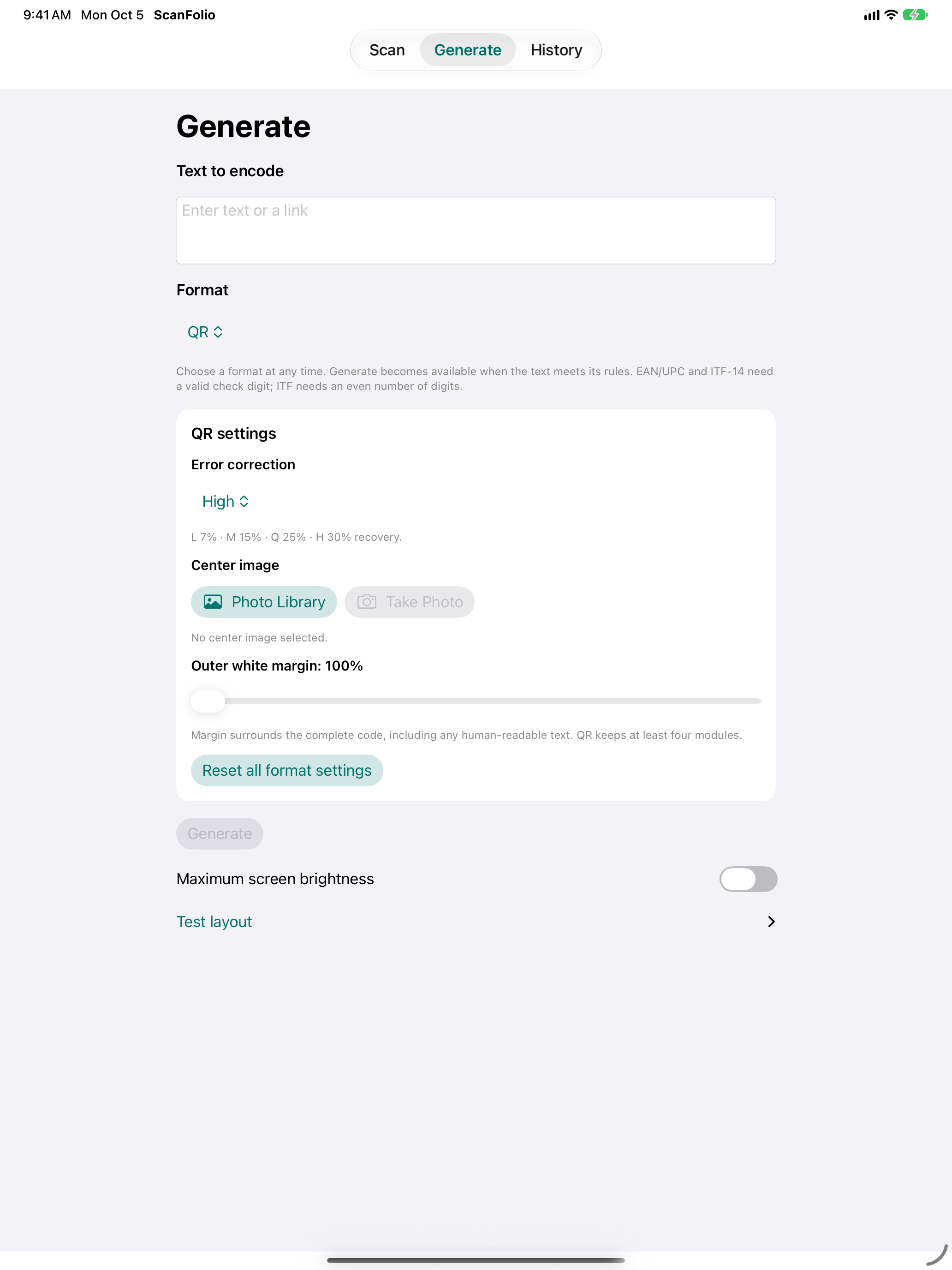
Pick a format and its available settings.
02
Give it a clear border.
Adjust the white space around the symbol.
03
Prepare your display.
Switch to maximum brightness. Set rotation in Test layout.
Actual app details with QR settings expanded. Settings vary by format.
SCAN. GENERATE. HISTORY.
Three tabs. One connected workflow.
01 / SCAN
Scan a link. Know more before you GO.
A QR code is just the beginning. ScanFolio highlights detected warning signs and possible redirects before you open a web link—so your next tap is an informed choice. Included in Basic. With Plus, keep your selected Scan result in History too.
Link warnings help you decide; they do not guarantee website safety.
Plus adds live MRZ, photo import and Capture recognition. General OCR runs after Capture or photo import.
02 / GENERATE
Create a code from your text.
Enter text or a link for a basic QR preview. With Plus, explore additional formats, adjust settings and save the generated PNG to Photos.
Plus includes Data Matrix, Aztec, PDF417, Code 128, Code 39, Code 93, EAN/UPC, Codabar and ITF formats.
03 / HISTORY
Save it. Come back to it.
With Plus, keep selected results and their available images in History. Search saved scan text to find it again, copy or share a value, or send saved text to Generate for a new code.
Access synced scans on your other devices when private iCloud sync and the required encryption keys are available.
YOUR SCANS. YOUR CHOICES.
Read on your device. Keep what you choose.
Recognition happens on your device. The content and images you save to History are encrypted with AES-256-GCM. Unlock History using iOS device-owner authentication.
Choose what to save, share and delete. ScanFolio includes no third-party analytics or advertising service.
Record IDs and dates are outside ScanFolio’s content encryption. iCloud sync uses your private database and iCloud Keychain.
START SIMPLE. GO FURTHER.
Everyday tools in Basic. More possibilities with Plus.
Buy the app for everyday barcode reading and basic QR previews. Add annual Plus through Apple when capturing text, saving scans or preparing reader tests becomes part of your routine.
BASIC
Buy once. Handle everyday codes.
For reading raw values, opening links and showing a QR from your text. No Plus subscription is needed for these functions.
Live barcode scanning
Full raw results and GO with web-link warnings
Camera zoom and torch
Text-to-QR preview on screen
PLUS · ANNUAL SUBSCRIPTION
Subscribe for the work you repeat.
For regular text capture, saved references and adjustable scanner tests—at home or on the job.
Everything in Basic
Photo and captured-frame recognition
Live MRZ and captured/photo text recognition
Additional code formats and settings
QR image overlay and full-screen viewing
Save generated PNGs to Photos
Searchable encrypted History, iCloud sync and sharing
Parsed ICAO MRZ and mandatory boarding-pass fields
An active Plus subscription is required for History access. Saved scans are retained if Plus expires. See the price and renewal terms presented by Apple before purchasing.
FROM EVERYDAY CODES TO YOUR OWN TESTS
Scan. Create. Test. Keep it together.
Start with the codes you read every day. Choose Plus for text you can reuse, scans you can revisit and test codes you can adjust.
Recognition depends on your camera, iOS version and image quality. Some generated formats and settings require a compatible reader. Decoding a barcode, checking MRZ digits or parsing boarding-pass fields does not verify authenticity, identity or ticket validity. NFC/ePassport chip reading is unavailable.
 ScanFolio